Overview
Payroll workflow design that brings confidence through visibility, from the enterprise to a single company
Netchex is a payroll and HR software company. OneScreen Payroll is the pre-payroll dashboard I designed for it, a single place where a payroll specialist can see whether payroll is ready to run and resolve anything standing in the way, across an entire organization or a single company.
I led the UX and the product strategy on the platform. Before this, I helped design the multi-company payroll engine that let specialists process every company in one run instead of one at a time. That solved speed, but it only told half the story, so the decision that shaped this work was not only about what the engine could do, it was about what it could reveal and resolve. That is what gave payroll specialists the confidence they were running payroll accurately and fast.
I led the design strategy end to end, working with the different teams and their product owners, designers, and engineers. I pushed the shift from processing to visibility and smart defaults, then helped make the call on what earned a place on the primary screen and what sat one level down.
The Problem
A dozen scattered screens, zero confidence.
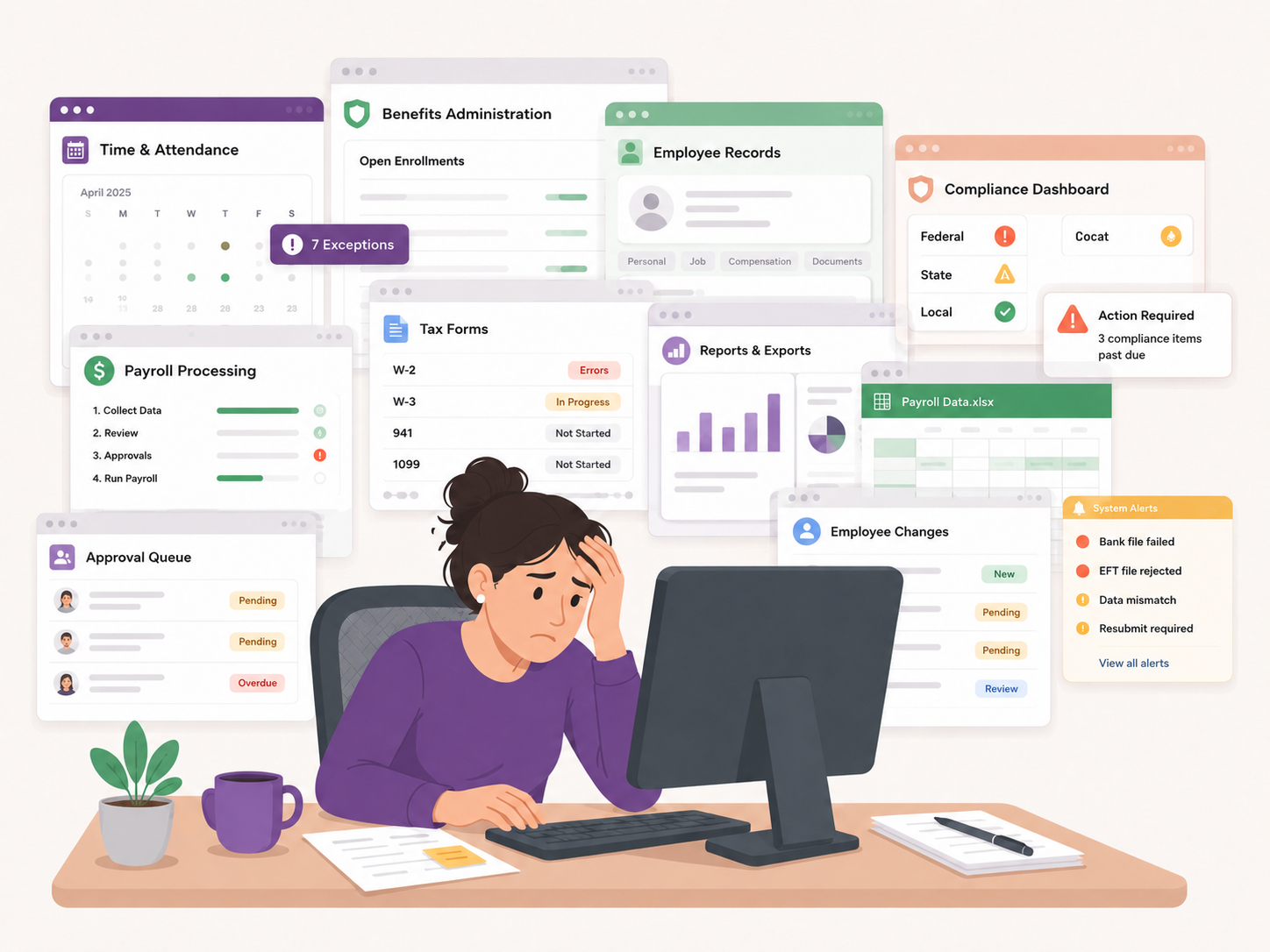
Payroll specialists at multi-location businesses had to process payroll one company at a time, and the information they needed lived across separate teams: time and attendance, benefits, taxes, and workflows, each with its own screen. When the old interface flagged an issue, a small icon shot the specialist off to another part of the site to fix it, then back again. Multiply that by every company and it turned payroll into an exhausting all-day task where errors were easy to miss. It was also a ceiling on growth, because a workflow built for one location did not scale to ten, and Netchex was selling into exactly those larger multi-company clients.
-
Scattered Systems
Information about time and attendance, benefits, taxes, and compliance all lived in different places.
-
One Company at a Time
Payroll specialists had to repeat the entire verification workflow for each location before processing payroll.
-
Manual Context Switching
Constant jumping between screens and systems wasted time and introduced errors.
-
No Overall Visibility
It was nearly impossible to see readiness across the organization or spot what still needed attention.
The Core Tension
Build more capability, or build more confidence
Multi-company payroll is a systems problem and a human one. The systems problem is the one everyone can see. Time and attendance, benefits, taxes, compliance, and pay rules all have to integrate and stay in sync without breaking. Netchex had that solved. By any product metric the engine was doing its job.
The human problem never showed up in a product metric. Payroll specialists were running payroll and hoping. Before hitting the button, nobody could tell you whether a missing timesheet was about to slip through, whether a pending benefits change would land in the wrong period, whether a state rule had changed, or whether a manager had made a late adjustment that created an exposure. Industry benchmarks put payroll cycle time at 24 to 36 hours for a well integrated automated workflow and 48 to 72 hours or more for manual ones, and cycle time is really a proxy for how well the pieces talk to each other. The speed problem and the confidence problem were the same problem seen from two sides.
So the brief I brought back was not what can we process faster. It was how does a payroll specialist know they are ready.
The Solution
One dashboard that knows the state of the run
I designed the Payroll Readiness Dashboard to answer one question before anyone hits submit: is payroll ready to run. A readiness percentage anchors it, starting near zero at the top of a pay period and climbing as timesheets land, approvals clear, and corrections resolve. It is not a grade, it is a signal that tells a specialist when they can stop guessing. Getting there came down to three decisions that had to work together.
The first was collapsing the silos into one readiness state. Time and attendance, benefits, taxes, compliance, and pay rules lived in separate modules, so understanding a run meant navigating between them and holding the picture in your head. I put every signal that affects readiness in one view and gave it a single number to roll up into. The readiness percentage is what makes the aggregation mean something instead of just being a longer list.
The second was making outstanding items resolvable in place. Most systems flag a problem and then send you somewhere else to fix it, which is where the day goes. I designed outstanding items to open a slide out tray inside the dashboard: the item, its history, its owner, and the actions available, including an intelligent default like Use Scheduled End Time for a missing clock out. The payroll specialist approves the default or makes a manual correction, the tray closes, the percentage moves. Outstanding items became the grammar of the interface rather than a separate workflow.
The third was letting the dashboard reshape itself around the person using it. A payroll specialist running forty companies needs a different view than a manager responsible for one. So widgets reorder, hide, pin, and save per user, with organization level priorities layered on top. Safety checks are the exception and stay locked on, always visible, not something anyone can switch off to make their dashboard look calmer.
Together they answer one question: can we run payroll accurately, right now, with confidence.
Readiness Dashboard
The whole organization in one view, and every run within it
I treated readiness as an organization level question before a company level one, so I put that at the top: every company in the org, sorted by proximity to its pay date and distance from ready, with a readiness percentage and outstanding item count for each. Getting there meant working with the teams whose data fed that number, time and attendance, benefits, taxes, and workflows, alongside their product managers, engineers, and designers, so every signal that affected readiness rolled into one place. Expanding a company opens the breakdown behind that number, from active, new, and terminated employee counts to direct deposit status and every outstanding item category in play. Selecting a single company drills into that specific payroll run, and the view reorganizes around one question: what has to be true before this run goes forward. Same readiness percentage, same outstanding items shape, just zoomed from all companies down to one. The constraint that shaped the layout was scale, because this view has to stay legible at a hundred companies and twenty managers, which is the point where most dashboards turn into a wall.
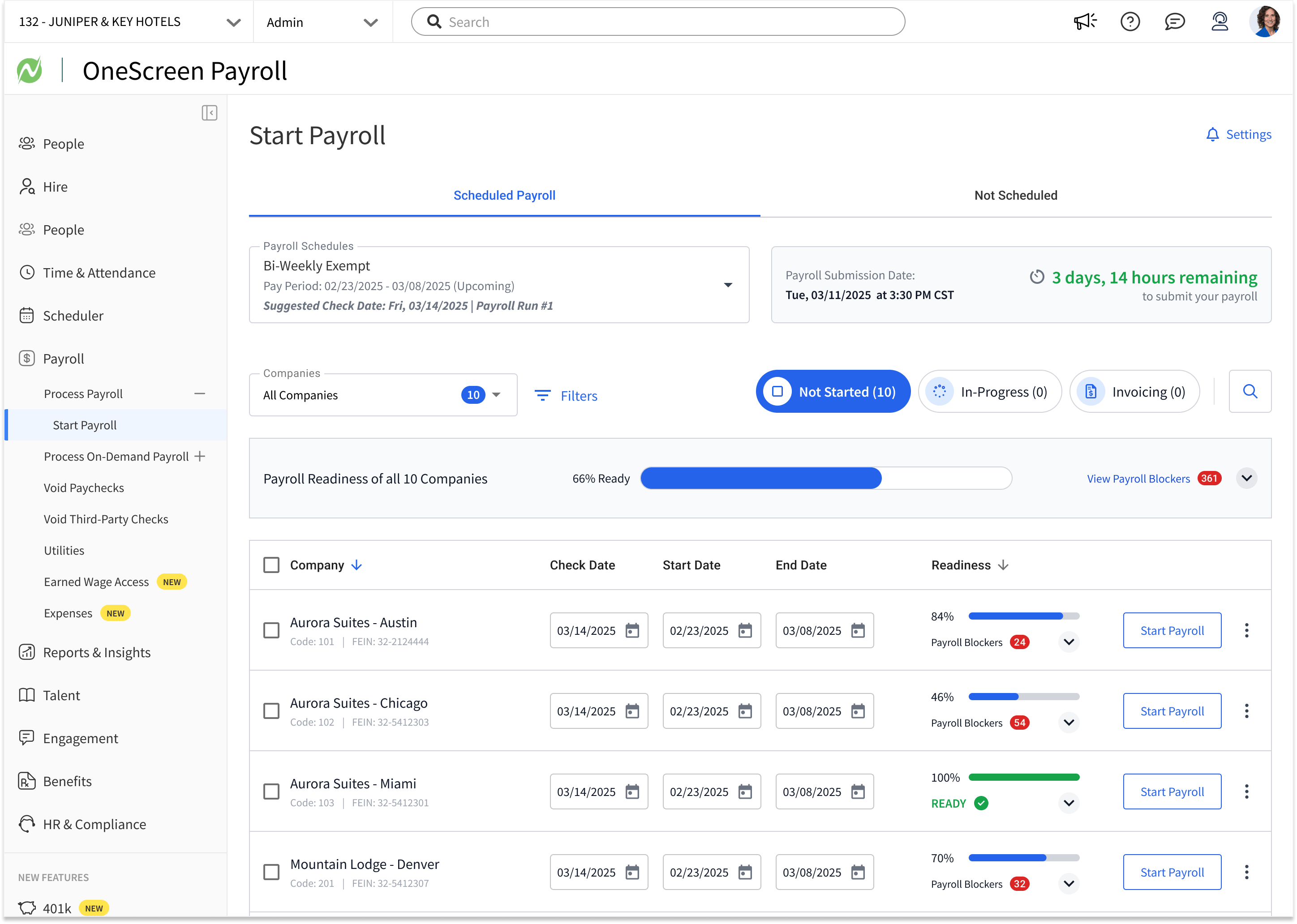 Organization View
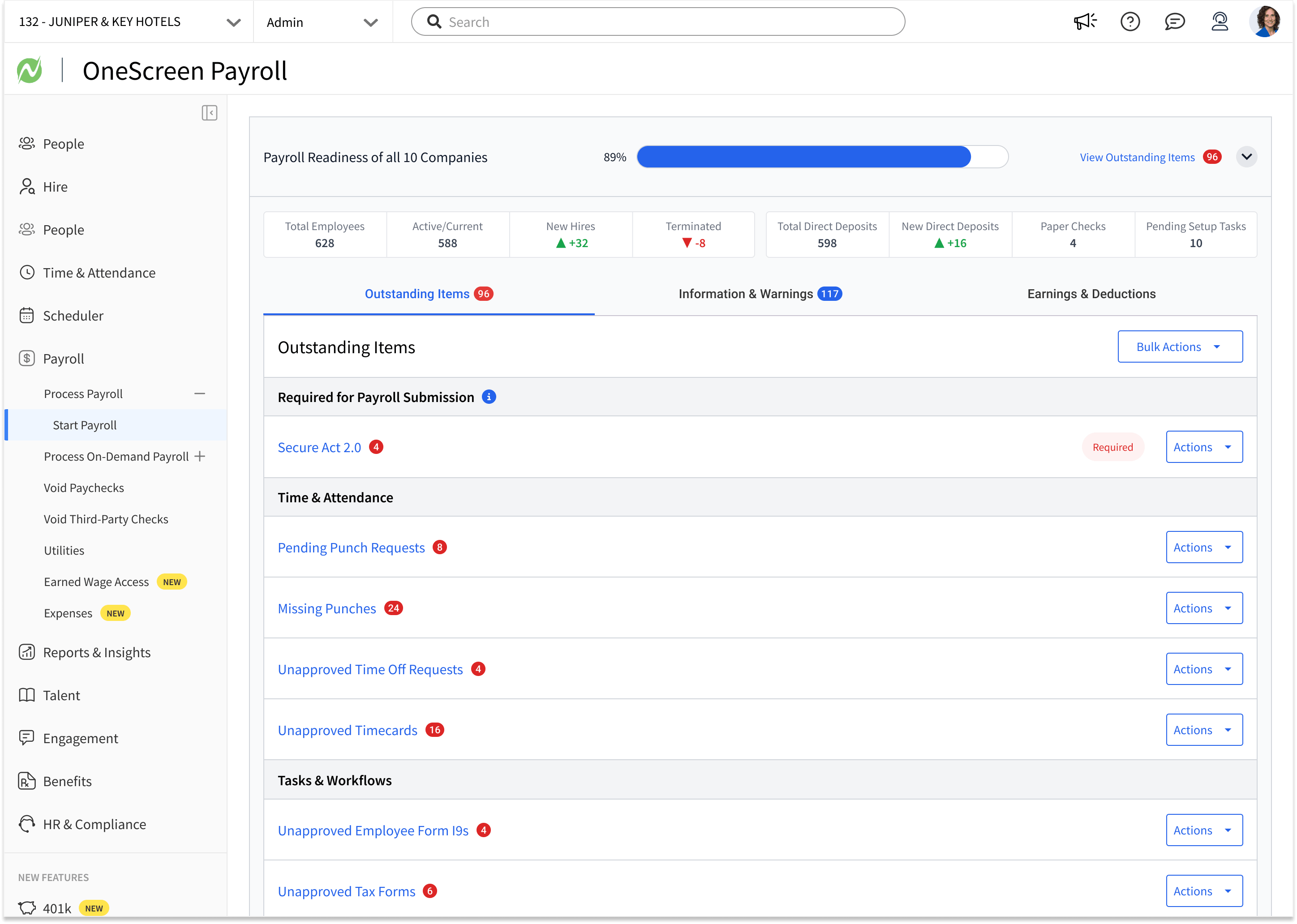 Readiness Breakdown
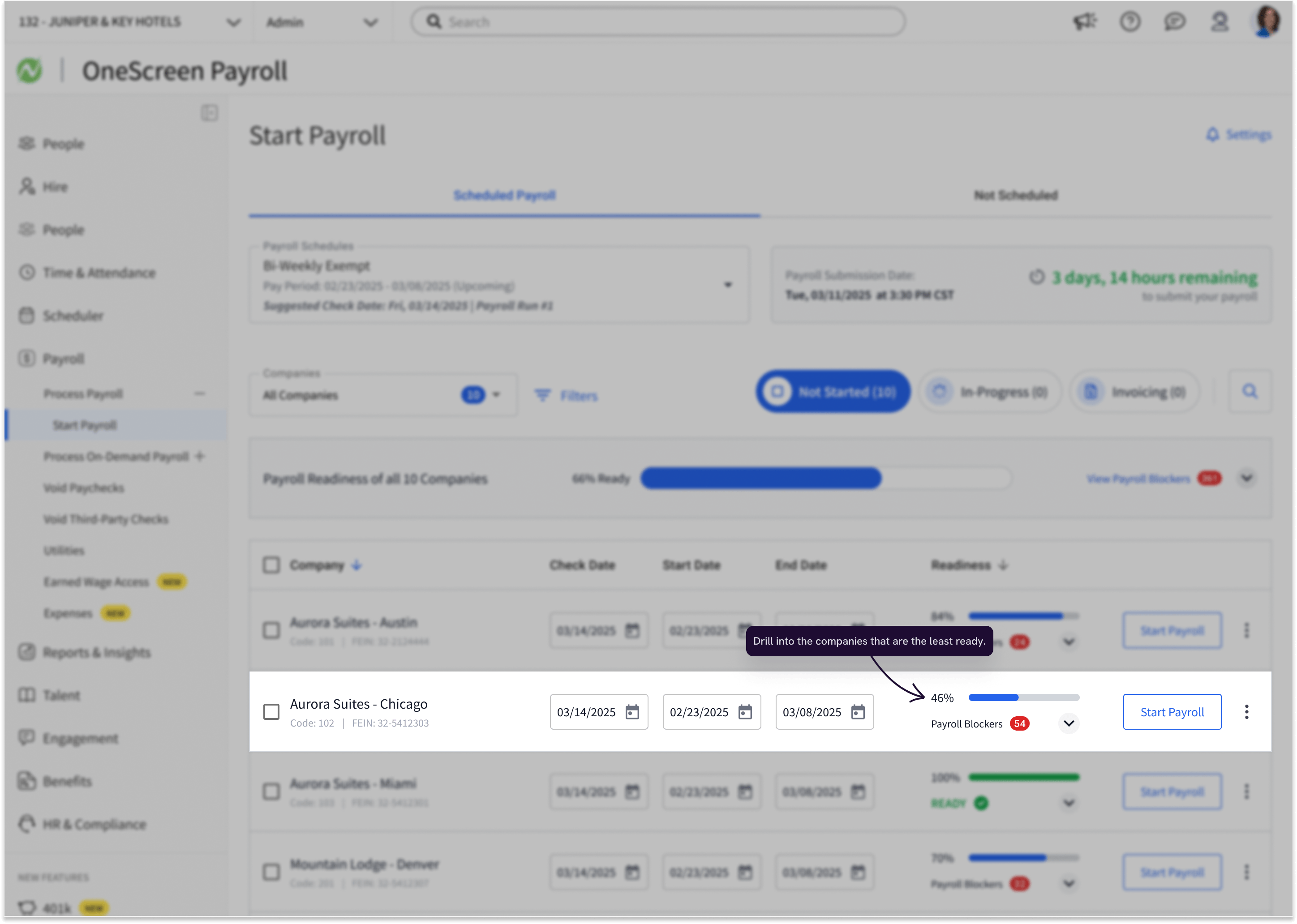 Drill Into the Least Ready
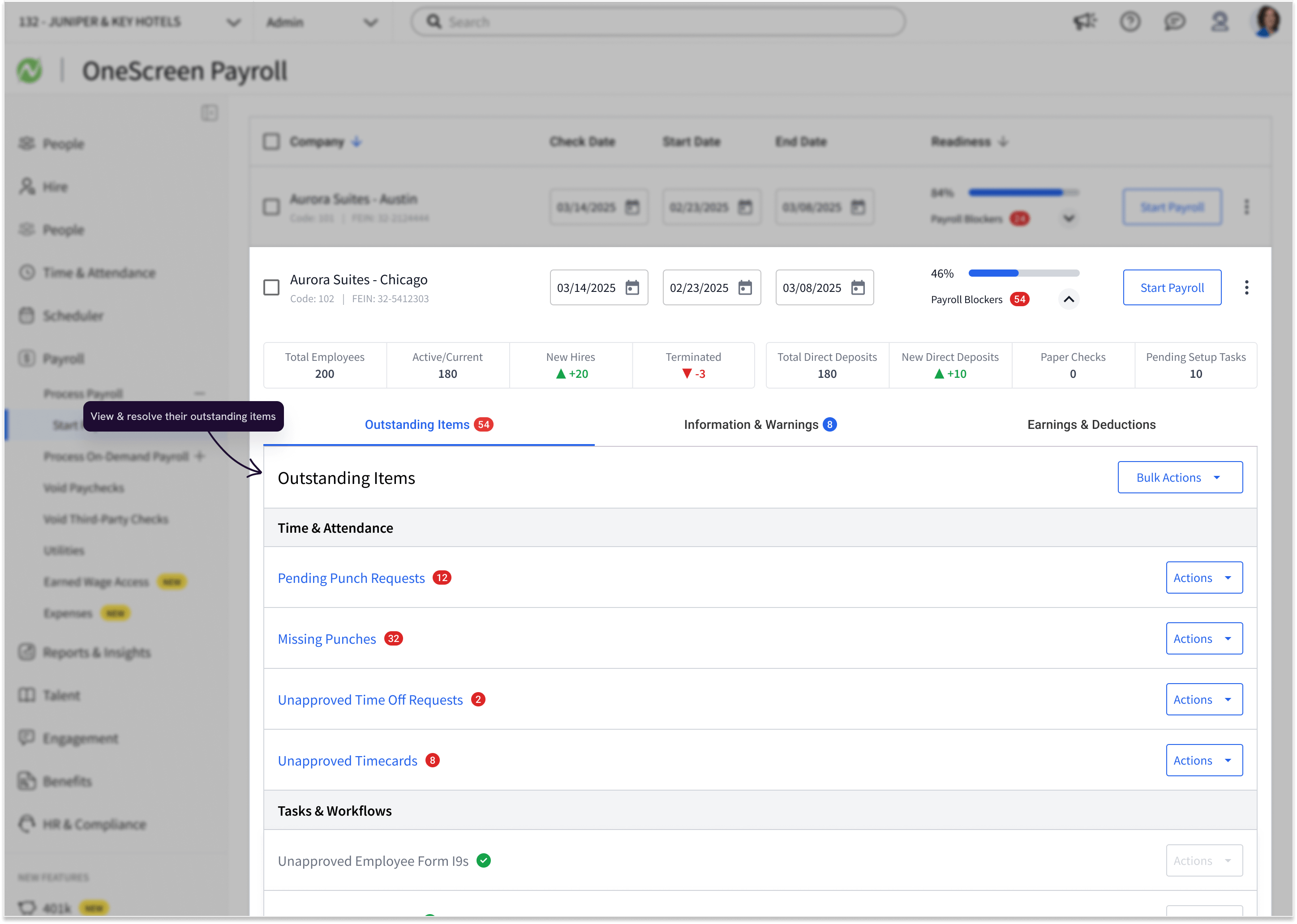 Company Drill-Down
Organization View
Every company in the organization, sorted by distance from ready, against a countdown to the submission deadline.
Compliance and Outstanding Items
Fix it without leaving the page
The decision that made outstanding items work was refusing to hand the payroll specialist off. That meant partnering with each of those teams to bring their fix into the dashboard, so a time and attendance issue, a benefits change, or a tax problem gets resolved on the payroll screen instead of sending the specialist into that team's own system and back. Clicking an item opens a tray inside the dashboard with the detail, the correction history, the owner, and the available actions. A missing clock out offers Use Scheduled End Time as a default. A missing timesheet shows when it was due and who to chase, with a premade notification ready to send. A pending benefits change shows what changed and which approval is missing. Everything resolves in context, and the history stays visible so the next person can see what was decided and why. Compliance work stops being an errand. Widgets within this view reorder, hide, and pin per user, with organization level priorities layered on top, so a payroll specialist running forty companies sees different outstanding item categories first than a manager responsible for one.
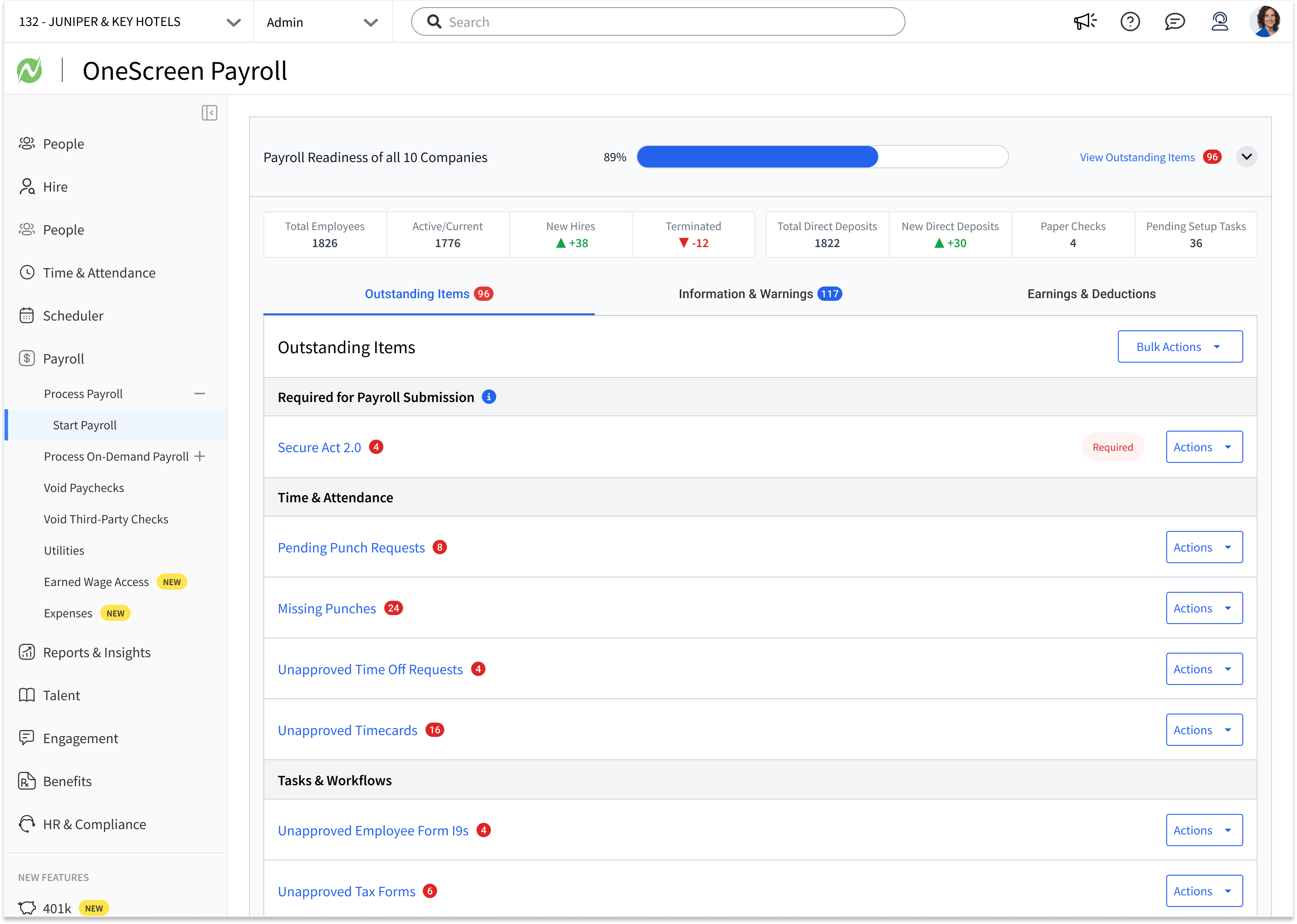 Outstanding Items
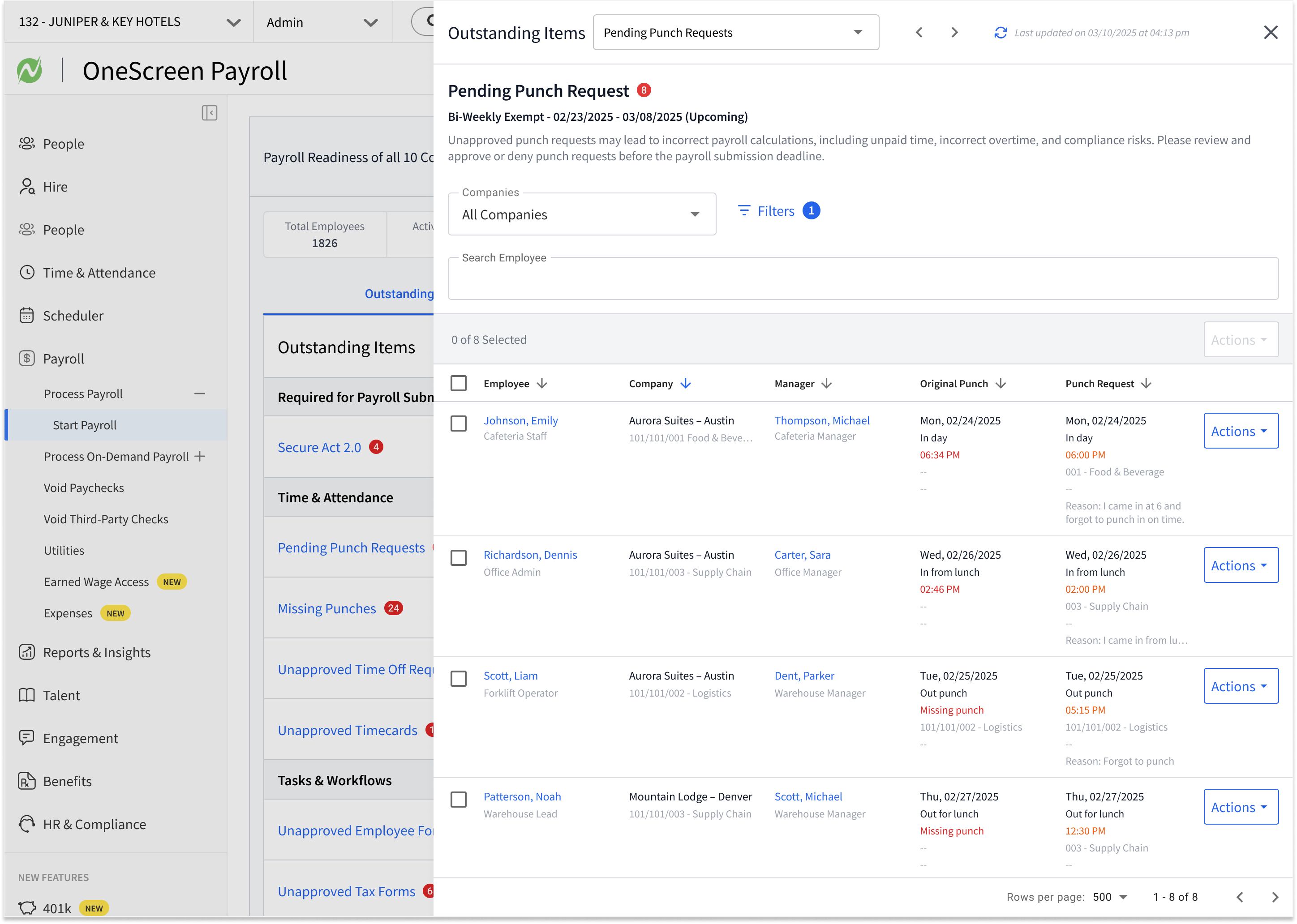 Pending Punch Requests
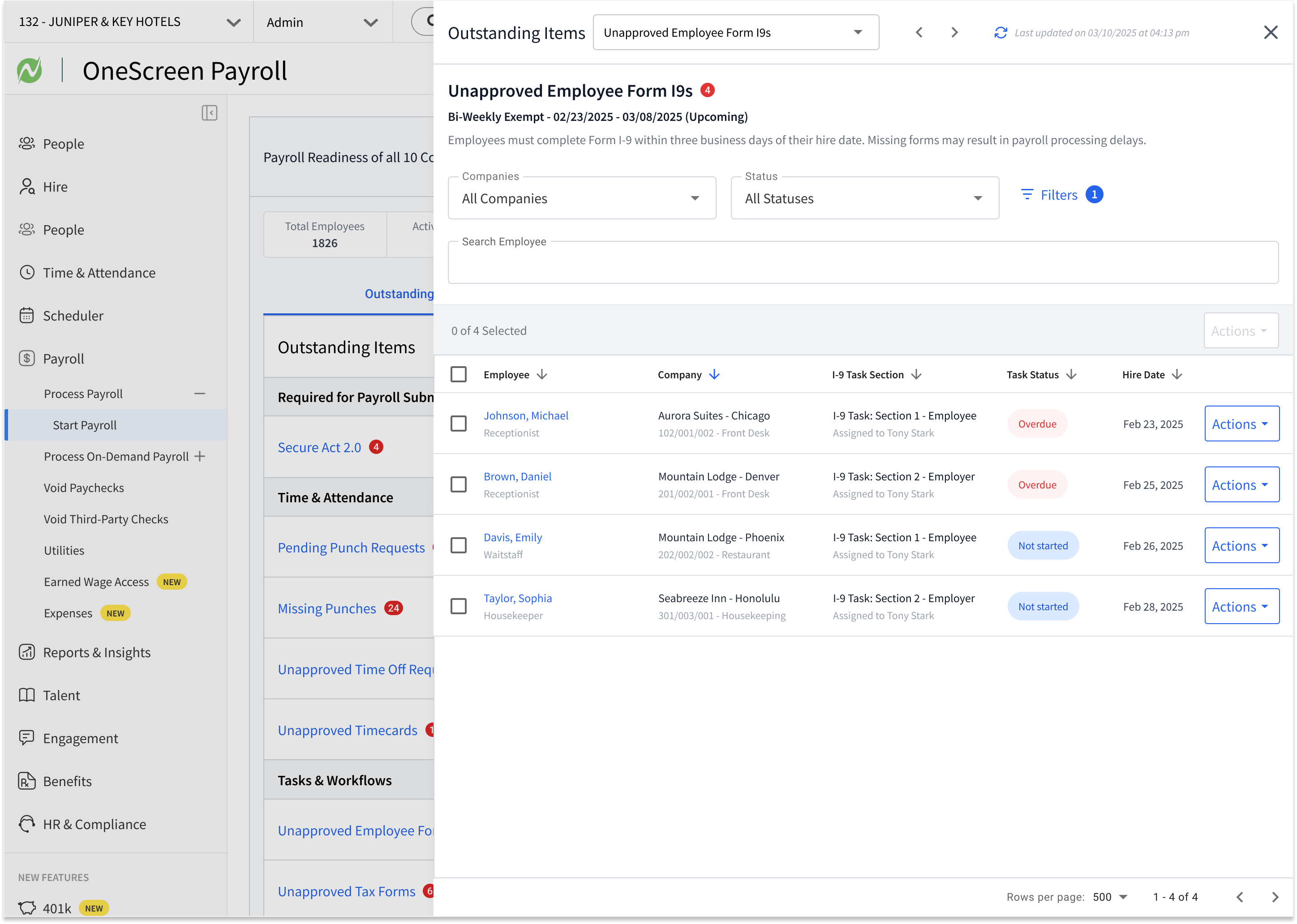 Unapproved Form I-9s
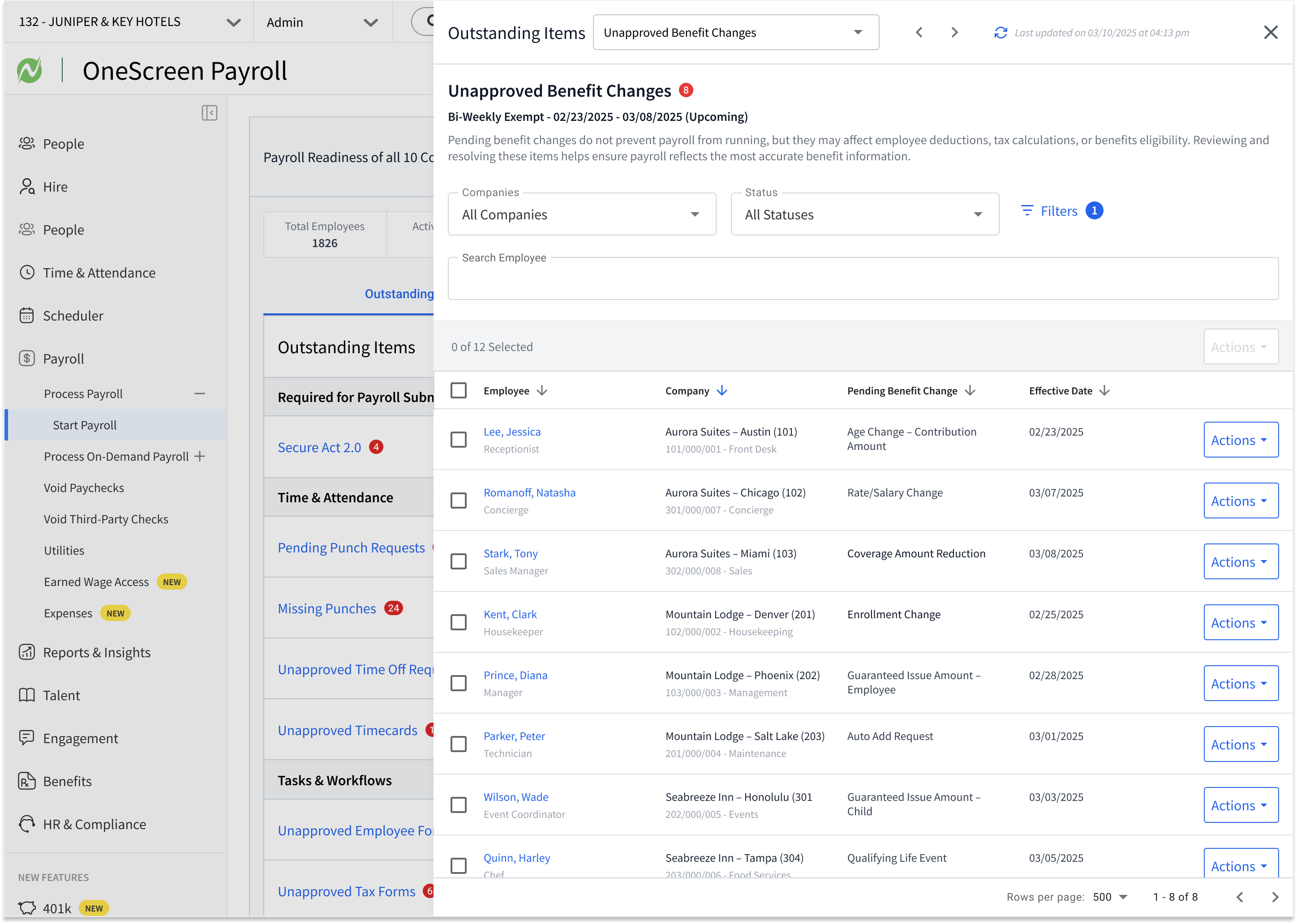 Unapproved Benefit Changes
Outstanding Items
Everything holding up the run, grouped by category, with what is required for submission called out first.
Informational Insights
Things worth knowing that should not stop the run
Not every signal is a blocker, and treating them all as blockers is how a readiness system loses credibility. Address changes, new hires, direct deposit updates, pay rate changes, overtime, retirement contributions, earned wage access activity: a payroll specialist should see these before payroll runs, but none of them should hold it. So working with those same teams to decide what each of their signals should count as, I gave them their own non blocking layer beneath outstanding items, ordered by priority, reviewed and acknowledged rather than resolved. The line between what stops payroll and what merely informs it is the thing that keeps the readiness percentage honest. What surfaces here is configurable too, so a category that does not apply to an organization can be moved out of view entirely rather than sitting in the way.
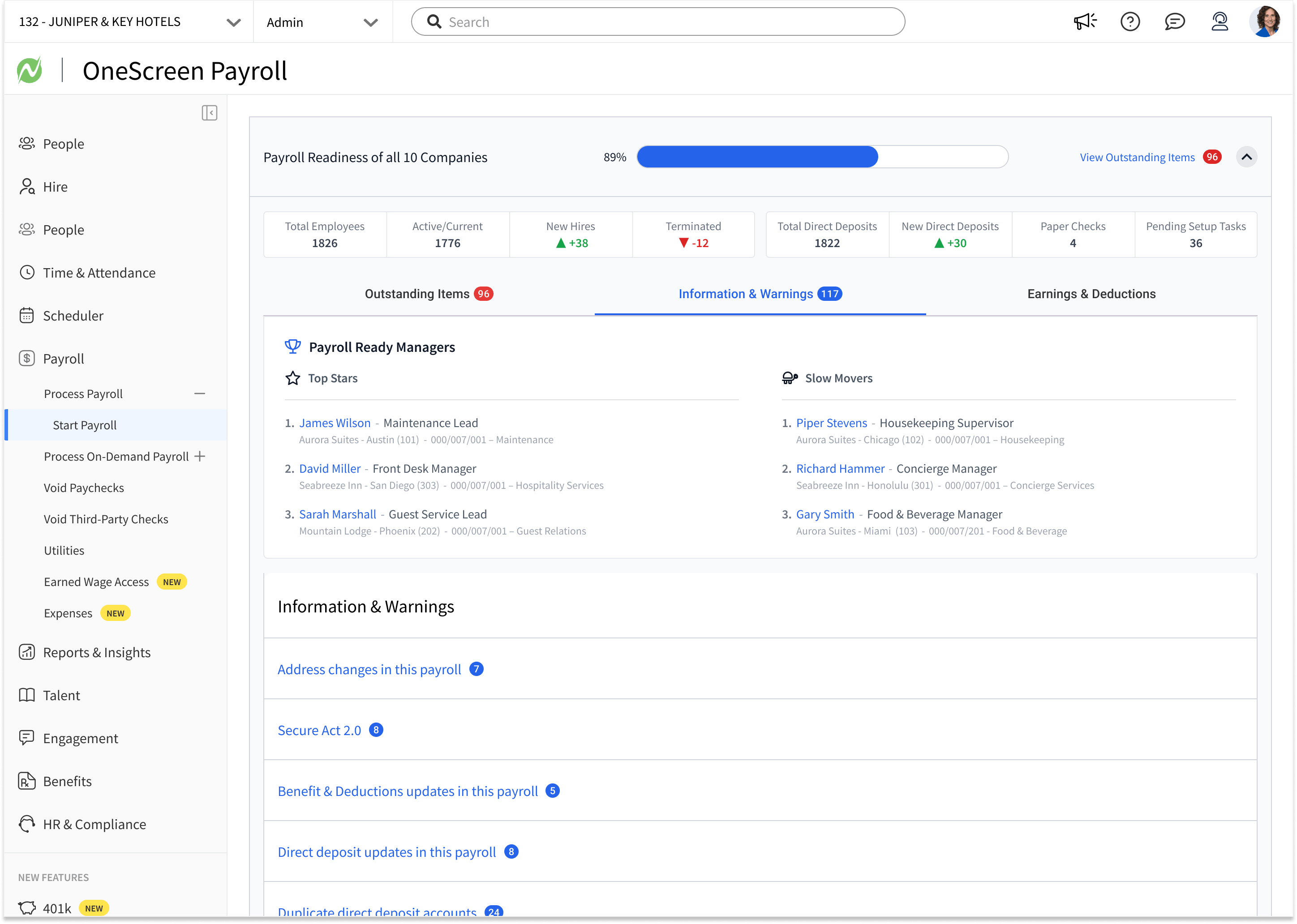 Information & Warnings
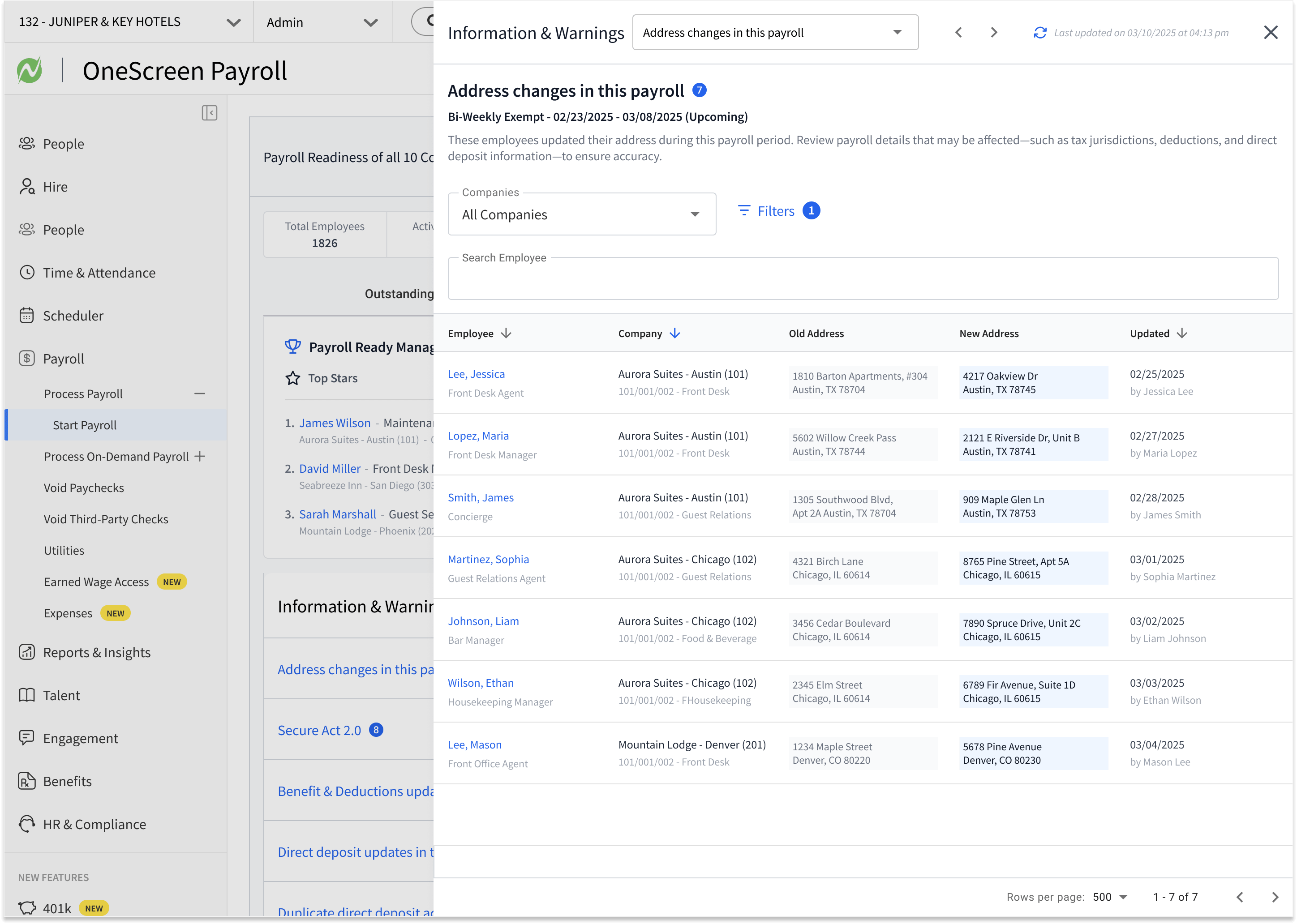 Address Changes
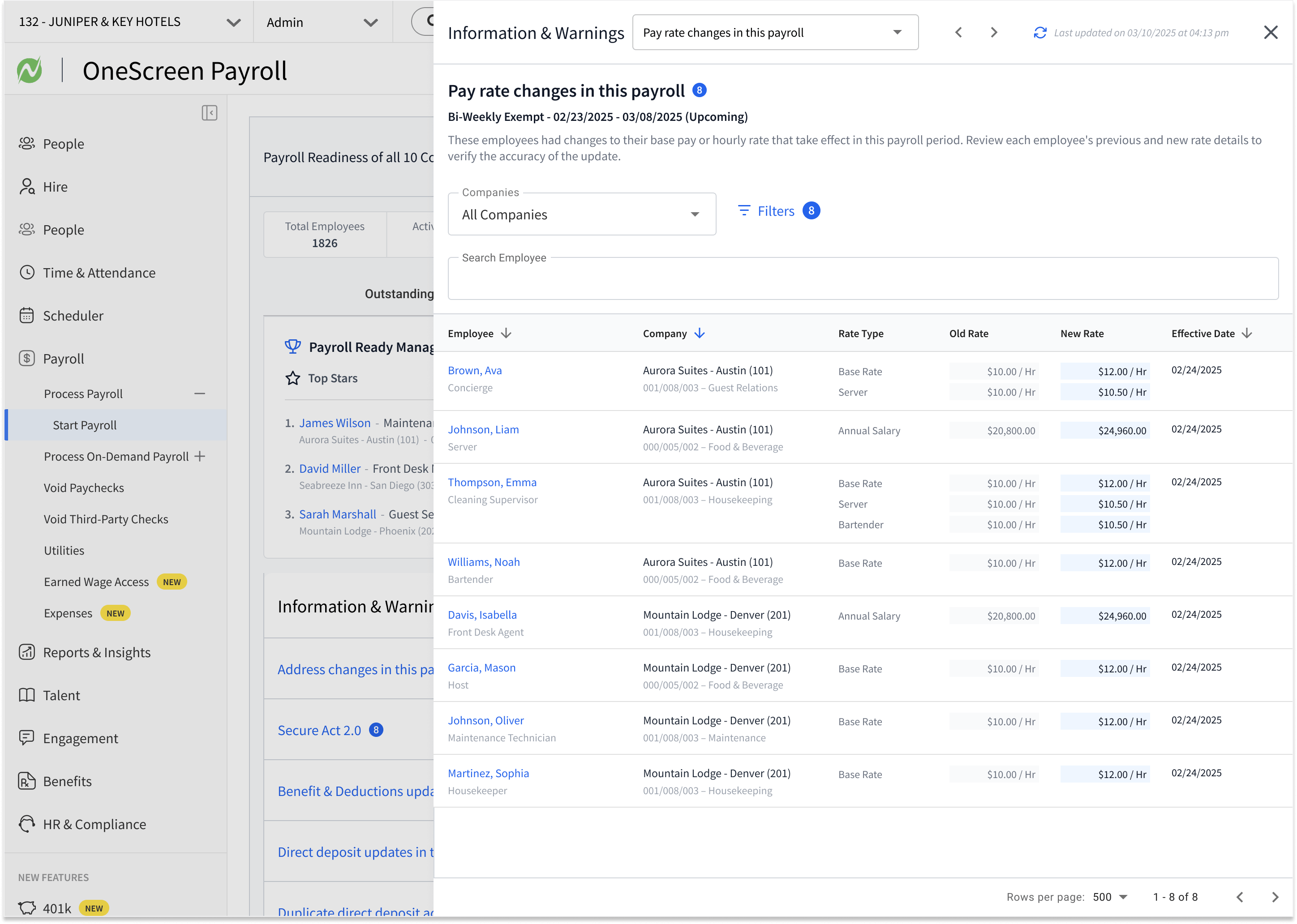 Pay Rate Changes
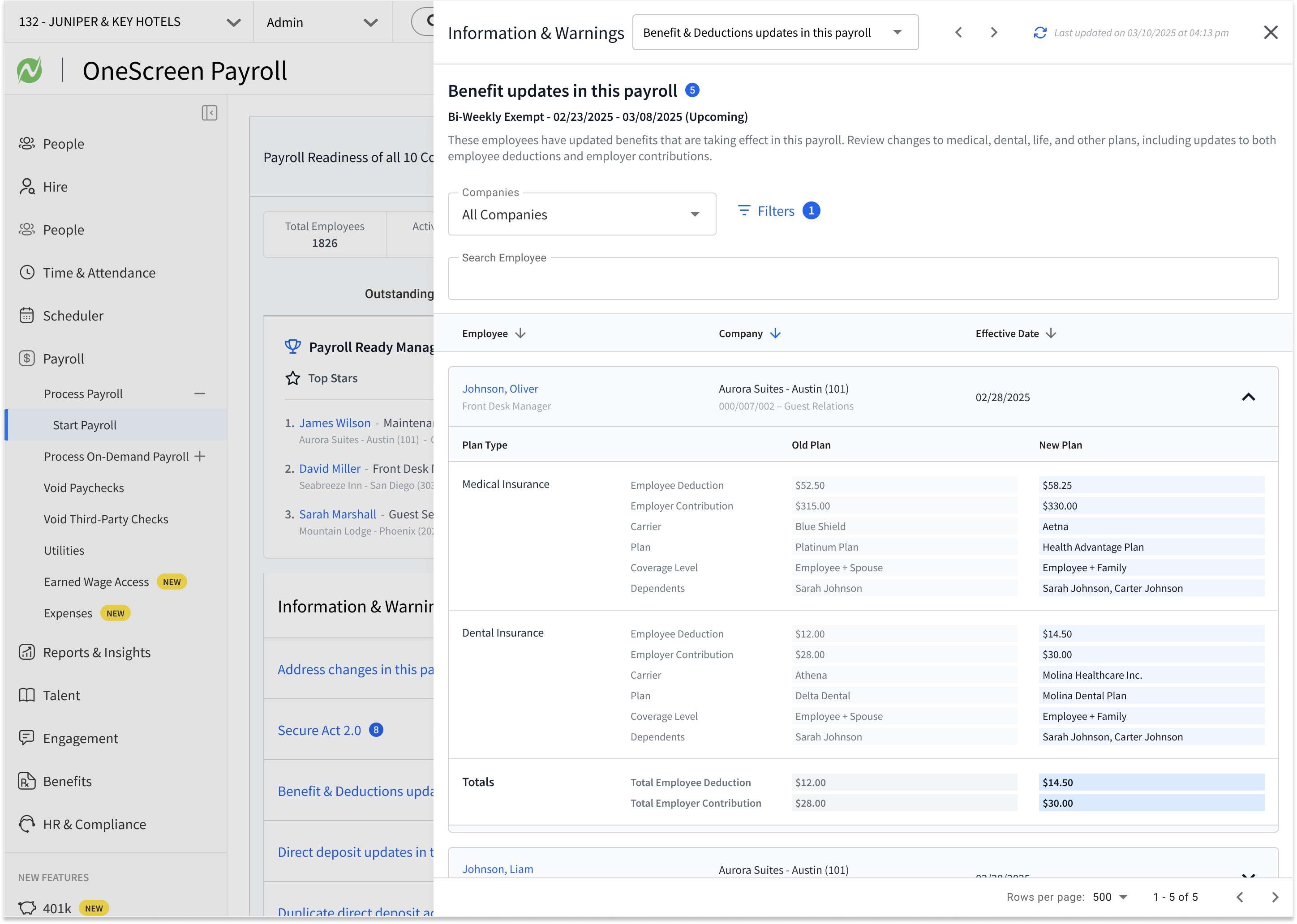 Benefit Updates
Information & Warnings
Non-blocking signals in their own layer, with Payroll Ready Managers surfacing who is ahead and who is behind.
Every piece of this came out of the same reframe. Confidence is a design problem, not a training problem. The readiness percentage turns a scattered set of signals into one number a payroll specialist can act on. Outstanding items turn that number into a list with owners. The trays collapse the distance between knowing something needs to happen and doing it. Personalization makes the same dashboard work for someone running forty companies and someone running one. Recognition makes preparation visible instead of invisible. None of it made the payroll engine faster. All of it made the person operating it certain.
Results
What the reframe made possible.
Changing the question from can we process faster to do we know we are ready is what produced these numbers. What used to take a full day for a single company now runs across an entire organization in a fraction of the time, not because the engine got faster, but because visibility replaced guessing. By surfacing every signal in one place and letting specialists resolve issues without leaving the screen, OneScreen shortened payroll cycles and gave teams confidence in every run, and Netchex reports fewer errors on its most complex payroll runs. The same principle carried into the wider platform, where Netchex reports 67% fewer shift no-shows once attendance exceptions surface the moment they happen. Underneath all of it, a Material Design-based system now scales across 12 HCM products for the 4,500+ mid-market organizations Netchex serves.
-
1
dashboard for an entire organization
Readiness signals that once lived across time and attendance, benefits, taxes, and compliance now resolve in a single view, from the organization level down to an individual payroll run.
-
15-minute
full payroll runs
Standard and multi-location payroll runs can be processed in about 15 minutes, with checks that previously happened after the fact moved in front of the run.
-
46%
fewer shift differential errors
Netchex reports this result across its payroll and Time & Attendance work, where bringing exceptions and readiness issues forward helps teams catch problems before processing.
Figures reported by Netchex
For context on the problem OneScreen was built for, Netchex reports that 1 in 5 payroll runs contains errors, at an average cost of $291 to fix each one, and that 1 in 2 HR teams spend 5+ hours a month resolving payroll issues. Netchex also cites up to 16 hours saved per week, a platform-wide customer efficiency figure used in the OneScreen launch materials rather than a result measured on OneScreen itself.
-
Having everything on one screen, especially for time card corrections and last-minute payroll checks, is going to make my process even smoother.
Joanne Skiba
HR Manager at CKJ Management
-
I love the integrated platform. It's user-friendly and makes training a breeze, plus the customer service is top-notch.
Chris Hayes
Payroll Benefits Manager at Southern Veneer Products
-
I used to highlight everything else before payroll in our demos. Now I lead with OneScreen Payroll because it's so efficient and saves our clients a huge amount of time and headache, especially for large organizations managing multiple companies.
Chris Roig
Director of Sales at Netchex
Reflection
What the work taught me.
The brief was capability. Build a bigger engine, process more companies, process them faster. The engine was not the thing that was broken. What kept coming up in research was the email three days after close saying a manager had corrected a timesheet, the benefits change that never made it in, the state rule nobody caught until a notice arrived.
Changing the question from what can we process faster to how do I know we are ready changed everything downstream. It made the dashboard a decision tool instead of a reporting tool. It made outstanding items the structure of the interface instead of a list off to the side. It made personalization a matter of respecting expertise instead of a settings panel.
The through line, and it is the same one I keep running into, is that the thing people ask for is capability, and the thing actually stopping them is not knowing where they stand. I wanted to call it Ready Set Payroll, and even though the name became OneScreen, that readiness idea is still what the whole thing is really about.